


 Settings
 Fast Delivery
 Free Shipping
 Incoterms
 Payment Types


 Marketplace Product

Smart I²C Voltage Translation: PCA9306 with Arduino Uno
2026-02-04 | By Rinme Tom
License: General Public License Logic Level Translator Arduino
Interfacing the PCA9306 I²C Level Shifter Module with Arduino Uno
In many embedded PCA9306 Module with Arduino Uno projects, especially when mixing logic levels, safely interfacing devices that operate at different voltages is essential. The PCA9306 module is a compact, bidirectional voltage-level translator designed for the I²C bus that makes this task simple and reliable. Unlike basic resistor networks or discrete MOSFET solutions, the PCA9306 integrates bidirectional level shifting into one component, ensuring consistent signal integrity between 3.3 V and 5 V devices, such as a 3.3 V sensor and a 5 V Arduino Uno.
What Is the PCA9306 Level Shifter?
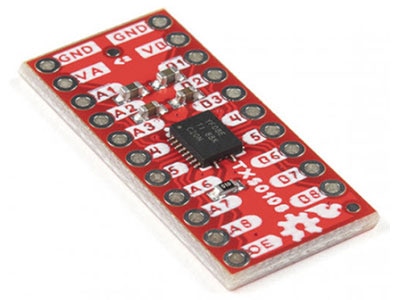
The PCA9306 Module is a dual bidirectional voltage-level translator for the I²C and SMBus protocols. It has two pairs of I/O pins (SDA and SCL) that can connect devices on different voltage domains without the need for manual direction control. An enable (EN) pin turns the translator on when pulled HIGH. The device supports low-voltage sides from about 1.0 V to 3.6 V and high-voltage sides from 1.8 V to 5.5 V, making it ideal for interfacing popular microcontrollers and sensors.
The PCA9306 works by automatically detecting signal direction and translating accordingly, meaning no changes are needed in your Arduino sketch. This automatic bidirectional behavior preserves the I²C protocol’s clock stretching, arbitration, and data timing — critical for robust communication.
Module Pins and Electrical Connections
Understanding each pin helps you wire the module correctly:
VREF1 (Low-Voltage Reference): Connects to the lower-voltage supply (e.g., 3.3 V).
VREF2 (High-Voltage Reference): Connects to the higher-voltage supply (e.g., 5 V).
SCL1 / SDA1: I²C clock and data lines on the low side.
SCL2 / SDA2: Corresponding I²C lines on the high side.
GND: Common ground reference shared by all devices.
EN (Enable): Must be pulled HIGH to activate the translator.
A shared ground between the Arduino and the sensor circuit is crucial — without it, the voltage references won’t align correctly, and the I²C bus can become unstable.
Step-by-Step Wiring with Arduino Uno
To connect a 5 V Arduino Uno to a 3.3 V I²C sensor (for example, a BMP180 pressure and temperature sensor), follow these steps:
Power the PCA9306:
Connect VREF1 → Arduino’s 3.3 V rail.
Connect VREF2 → Arduino’s 5 V pin.
Connect I²C Lines:
SCL1/SDA1 → Sensor’s clock/data pins.
SCL2/SDA2 → Arduino Uno’s A5 (SCL) and A4 (SDA) pins.
Tie Grounds Together:
Connect all GND points — sensor, PCA9306, and Arduino.
Enable the Module:
Ensure EN is pulled HIGH (often tied to the high-voltage reference).
With this wiring, upload your usual I²C sketch — the PCA9306 doesn’t require any special configuration in software.
Example Arduino Code
Once the wiring is complete, your sketch can use common I²C libraries like Wire.h and sensor-specific libraries. Because the PCA9306 does the translation in hardware, your code remains unchanged from a single-voltage setup. For example, initializing the BMP180 sensor and printing temperature and pressure to the Serial Monitor works exactly as expected.
#include <Wire.h>
#include <Adafruit_BMP085.h>

Adafruit_BMP085 bmp;

void setup() {
  Serial.begin(9600);
  Wire.begin(); // Starts I2C on Arduino
  if (!bmp.begin()) {
    Serial.println("Sensor not found. Check wiring!");
    while (1);
  }
}

void loop() {
  Serial.print("Temperature: ");
  Serial.print(bmp.readTemperature());
  Serial.println(" °C");

  Serial.print("Pressure: ");
  Serial.print(bmp.readPressure());
  Serial.println(" Pa");

  delay(1000);
}
Tips and Troubleshooting
Here are some best practices to avoid common issues:
Pull-up resistors: Some PCA9306 modules include pull-ups on the low-voltage side, but you might need additional pull-ups on the high-voltage I²C lines for stable communication.
Bus capacitance: Long wires increase capacitance and can slow edges. Keep connections short to support faster I²C speeds.
EN pin: Always ensure the enable pin stays HIGH; floating EN can prevent level shifting.
Because the PCA9306 supports standard and fast I²C modes up to roughly 400 kHz, it works well with most common sensors used in makerspace projects.
By integrating the PCA9306 voltage-level translator in your Arduino projects, you eliminate voltage incompatibilities between mixed-voltage systems while preserving the simplicity of I²C communication. This makes it a valuable tool for makers, IoT developers, and hobbyists looking to expand sensor compatibility without complicating code or hardware design.









 Malaysia